Platform functions

Jexenford's Core Functions and Capabilities

An overview of what the Jexenford platform is designed to do, how each function operates within the service, and how users engage with them in practice.

How the functions relate

Four interconnected functions, one organised service

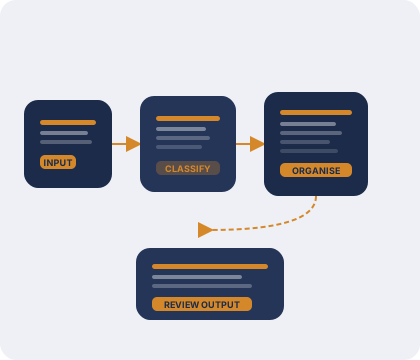
The Jexenford service is made up of four primary functions. Each is distinct in its purpose, but all contribute to the same goal: presenting information in an organised, reviewable form that is accessible to the user. The functions are not sequential steps but concurrent features of the service that users engage with according to their needs.

Where AI assistance is involved, it operates in the background as a classification and organisation layer. Users interact with the results of that process through the interface rather than with the AI component directly.

Core functions

What the service does

01

Structured data review

This function gives users access to information that has been arranged and sorted according to its content and type. Rather than presenting raw or unsorted data, the service groups information into recognisable sets. Users can scroll through categories, examine the content of individual groups, and compare what is available across different subject areas.

The review interface is designed to be navigable at a pace determined by the user. No specific knowledge of the underlying organisation logic is required to use this function effectively.
02

AI-assisted classification

An AI layer analyses incoming information and applies a classification scheme to it. This scheme determines how information is grouped and what labels or categories are applied before the material is presented to the user. The classification process runs in the background and its results are reflected in what users see when they open the review interface.

The classification logic is based on the structure and content of the information itself. It does not involve user-level preferences or adaptive personalisation beyond what is required to produce an organised output.

03

Navigable review interface

The interface through which users interact with the service is designed to make navigation straightforward. Information is presented with clear headings, organised sections, and a layout that reflects the classification applied by the system. Users can move between sections, filter by category, and return to previous views without losing context.

The interface is designed for desktop use but is accessible on smaller screens. No additional software is required to use it; a standard browser is sufficient.

04

Enquiry and access handling

Users who wish to access the service, raise a question, or request clarification can do so through the enquiry function. A structured form collects the relevant details, which are reviewed by the Jexenford team. Responses are provided by email where the team is able to assist.

This function does not operate as an automated response system. Each enquiry is read by a team member, and the response is tailored to the nature of the request.

How to get started

From enquiry to access: a four-stage process

Users who are new to the Jexenford service typically follow a straightforward sequence before gaining access to the review interface.

Review the documentation

Read through the platform overview and this functions page to understand what the service does and what to expect before requesting access.

Submit an enquiry

Use the enquiry form to describe your requirements and indicate what type of access you are seeking. Include any relevant context that will help the team respond accurately.

Receive a response

The team reviews each enquiry and responds by email. They may ask for clarification before proceeding. Access is not automatic and depends on the nature of the request.

Access the interface

Once access has been confirmed, you will receive further guidance on how to use the review interface. The team remains available if questions arise during use.

The review interface

Designed for clarity rather than complexity

The Jexenford interface presents information without requiring users to understand the classification logic behind it. Categories and groupings are labelled in plain language, and each section is accessible from a persistent navigation area within the interface.

Where information spans more than one category, the interface provides cross-references rather than duplicating content. Users can trace connections between areas without losing their position in the current view.

  • Plain-language category labels throughout
  • Persistent navigation within the review area
  • Cross-references for information spanning multiple categories
  • Accessible on standard browsers without additional software
  • Designed for desktop use with mobile accessibility

Questions about what the service can do?

If the functions described here do not fully address your requirements, the team is available to discuss your specific situation. Send an enquiry and a team member will respond.